01 — Flat
The phone has no depth
Every capable computer already lives in a pocket — compute, storage, connectivity, apps. What it cannot do is put anything in the room with you.
InfinityID Labs — human interface layer
HoloDock is a pocket-sized optical engine that turns an ordinary phone into a spatial computer. The phone keeps the compute, storage and apps. HoloDock adds the light field, the depth sensing and the space to put things in.
Spatial computing does not need another computer. It needs a hardware interface layer that the computer people already carry can plug into.
Every capable computer already lives in a pocket — compute, storage, connectivity, apps. What it cannot do is put anything in the room with you.
Standalone spatial hardware duplicates the phone, then asks people to wear it. The compute problem was solved a decade ago; the interface problem was not.
Developers have no sanctioned route from an existing mobile app to a spatial surface — so spatial computing stays a separate platform instead of a new output.
InfinityID builds the layer between them — one identity, one spatial context, one interface, across the phone you own and the space you are standing in.
A handheld optical engine, not another computer. Twelve nodes on a Metatron lattice carry the projection, sensing and anchoring hardware; the phone on the other end of the cable does the thinking.
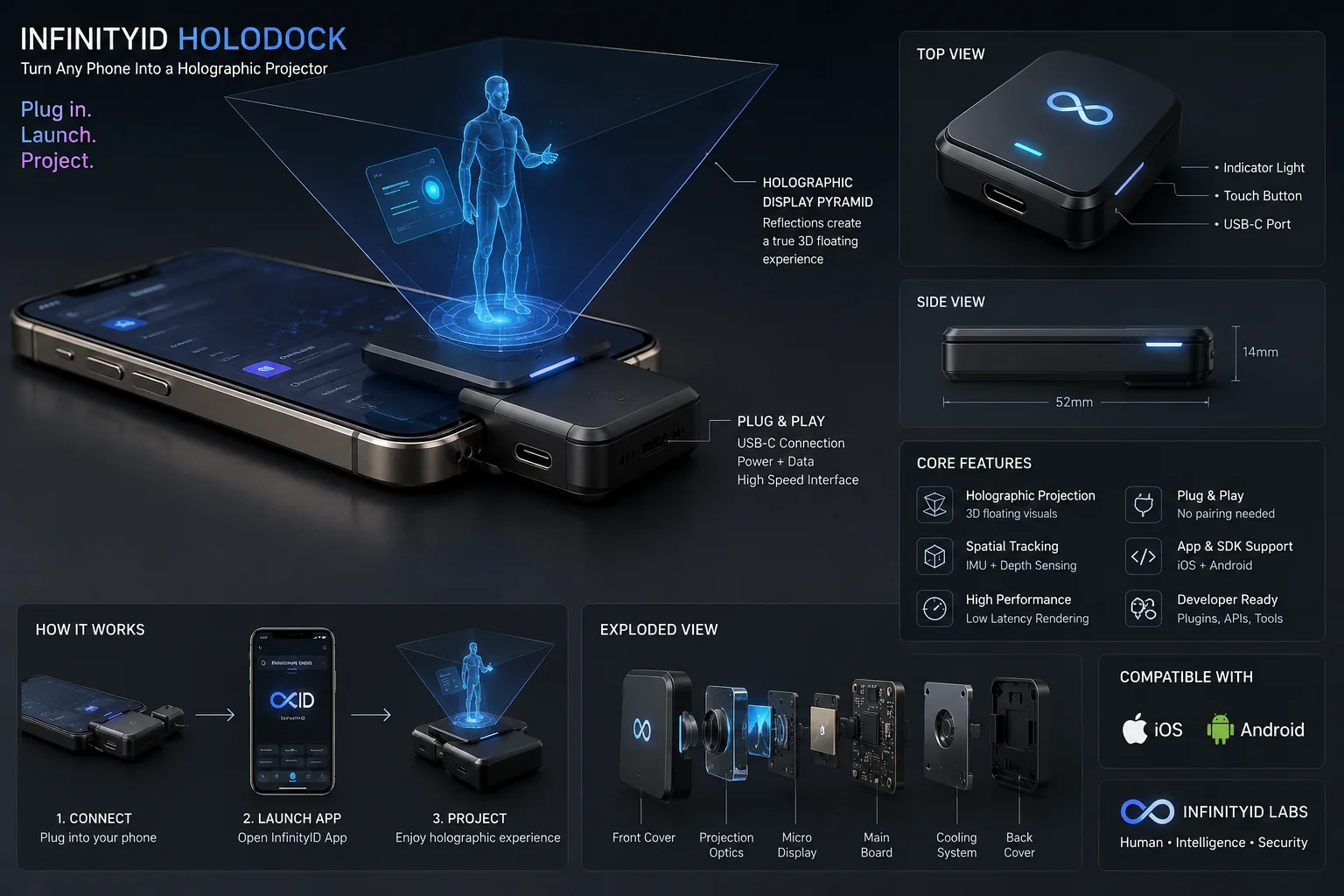
Three moves, and none of them are setup. The dock is a display and a sensor package — the phone stays the computer, and SpatialOS does the rest.
The dock takes the phone's USB-C port. One cable carries power and data at full speed — nothing to pair, nothing to charge, nothing to configure.
SpatialOS claims the dock, calibrates the projection against the room in front of it, and takes over the render loop.
The display pyramid folds the phone's output into a true 3D image above the screen. Move around it and the parallax holds.
Indicator light
Session state at a glance — idle, live, projecting
Touch button
One control: wake, capture, dismiss the scene
USB-C port
Power and data · high-speed interface
52 × 14 mm
Pocket-sized body, no case needed
Volumetric light engine
Micro-OLED stack + waveguide · 60 fps light field
Holographic display pyramid
Reflections fold into a true 3D floating image
Depth & LiDAR module
0.2–4 m reconstruction · 30 Hz environment mesh
AI vision cameras
Stereo RGB · 120° FOV · passthrough capable
Spatial audio array
4-mic beamforming · dual full-range drivers
USB-C host link
Power, video and MCP transport on one cable
Exploded view — 12 structural modules
Dimensions
52 × 14 mm dock body
Controls
Single touch button · status indicator
Optical engine
Micro-OLED + waveguide · 60 fps
Depth
LiDAR + stereo pair · 0.2–4 m
Compute
On-module NPU · host GPU offload
Power
USB-C PD passthrough from the host
Materials
Aviation-grade aluminium · sapphire optics
Host support
iOS 17+ · Android 14+
Protocol
Native MCP server · OpenCV bridge
Specifications describe the current engineering target and are subject to change before production.
Complexity happens underneath: optics, sensor fusion, permissions, transport. Above the line, a developer positions an object in space and it appears.
Hardware
The optical engine. It carries projection, depth sensing and spatial anchoring — and no user data. One USB-C cable is the whole integration surface.
Phone runtime
The control centre that runs on the phone. It composes the scene, drives calibration, and renders every frame the dock projects.
Extension platform
A sanctioned plugin model, not injection into other people's apps. Developers adopt the SDK and declare the capabilities they need.
Signal path — intent to light
HoloDock is the hardware half. SpatialOS is the other one: phone apps, spatial interfaces, AI agents, MCP servers, developer plugins, cloud services, identity and permissions, all addressed through a single runtime.
System architecture — select any node
Everything to do with where things are and how they are drawn. The runtime turns a scene graph into a calibrated light field the dock can project, and keeps it anchored while the room and the phone move.
Capabilities
Developer API
spatial.scene.create()
spatial.anchor.create()
spatial.object.place()
spatial.environment.scan()
spatial.input.onGesture()
spatial.device.calibrate()Openware is an extension model, not a way to modify apps you do not own. A developer adds the SDK, declares capabilities in a manifest, and the app gains a spatial surface on any paired dock.
# infinityid.plugin.toml
[plugin]
app = "com.example.fitness"
sdk = "openware/1.0"

[capabilities]
spatial            = "required"
holographic_output = "required"
camera             = "required"
motion             = "required"
microphone         = "optional"

[[surface]]
kind   = "model"
id     = "body.skeleton"
anchor = "user.front"

[[surface]]
kind   = "panel"
id     = "rep.counter"
anchor = "world.left"

[[surface]]
kind   = "agent"
id     = "form.coach"
voice = truePlayback controls become an anchored spatial visualiser.
Turn-by-turn navigation laid over the room and the route ahead.
A live skeleton beside you, with form correction from an agent.
Captured depth replayed as a volumetric photo you can walk around.
Conversations as floating panels anchored where you left them.
Models lifted off the screen at true scale before they are machined.
On platform rules: Openware never injects into third-party applications. Both mobile platforms restrict that, and it would be the wrong architecture regardless — a declared manifest scales, a hack does not. Plugins ship because their authors chose to ship them.
You do not rebuild your services to go spatial. Register the MCP server you already run, choose which tools SpatialOS may call, and the Agent Kernel can use them the moment the scene needs them.
Path of a tool call
Dev MCP Server
stdio · your laptop
App MCP Server
HTTPS · your backend
Device MCP Server
USB-C · the dock
Cloud MCP Server
SSE · shared org tooling
InfinityID dashboard — connect MCP server
Not connectedInterface preview — no request leaves this page.
Connected MCP server — fitness_backend · Development
12 tools discovered · 7 shown
Security layer
Tool-level permissions
Each tool is granted, not the server as a whole.
User approval
Consent-scoped tools prompt the person, per call.
Device permissions
A tool can be allowed on the dock and denied on the phone.
Agent permissions
Named agents, not every agent in the org.
Scoped API keys
One key per project, environment and capability set.
Token rotation
Rotate from the dashboard without redeploying the app.
Audit logs
Every call recorded with caller, device, arguments and result.
Revocation
Kill a server, a tool or a key and calls stop mid-session.
Environment separation
Local, development and production never share credentials.
Connect your app, your agent or your MCP server to SpatialOS in minutes. The simulator means you can finish the whole loop before a HoloDock exists on your desk.
InfinityID removes the need to build separate systems for hardware control, spatial rendering, agents and external tools. Developers connect them through one platform.
Step 03
Pick what the app is allowed to reach. Selections become the permission manifest in step 09 — nothing is granted implicitly.
5 selected · written into the permission manifest
{
  "name": "Spatial Fitness Coach",
  "version": "1.0.0",
  "platform": [
    "ios",
    "android"
  ],
  "capabilities": [
    "camera",
    "pose",
    "voice",
    "spatial"
  ],
  "agents": [
    "fitness_coach"
  ],
  "mcpServers": [
    "fitness_backend"
  ],
  "spatialViews": [
    "coach",
    "rep_counter",
    "body_model"
  ]
}
Spatial app manifest
Platforms, capabilities, agents, MCP servers and spatial views in a single declaration. The dashboard reads it, the runtime enforces it, and the store shows the user what it asks for before they install.
Projects, MCP servers, discovered tools, paired devices, saved scenes, keys and audit logs — the whole spatial deployment in one place, per environment.
Overview
Spatial Fitness Coach · development
Development · build 128
Fitness Spatial · Showroom · Service Notes
fitness_coach · design_assistant
1 local · 2 development · 1 production
1 dock in developer mode
Last 7 days
38 ms median gateway latency
All in development, none in production
12 minutes ago · development
Connect your apps, agents and tools to InfinityID SpatialOS and start building interfaces that move beyond the screen.
SDK access can begin before HoloDock hardware is available, using the SpatialOS simulator.
Three commitments that shape every decision in the stack — and the order they are weighed in when they conflict.
Human interface layer
The system reads people, not commands. Presence, attention and intent are first-class inputs — so the interface can be spoken to, pointed at, or simply stood in front of.
Agent layer
Agents that reason over what the device can see and hear, running on the phone where latency matters and in the cloud where scale does.
Trusted device layer
A device that watches a room has to be accountable to the person holding it. Capabilities are declared, granted per plugin, and revocable — and sensor data stays under the user's control.
The same intent router that drives the dock runs this site. Say a command, or type it — both resolve through one grammar.
“Hey Infinity — show me the device, then open the developer access form.”
Speech recognition runs in your browser. Nothing is recorded, and no audio leaves the device — the transcript is matched against the intents listed opposite and then discarded.
awaiting voice input…
idle — awaiting input
Live speech capture is unavailable in this browser — the text console runs the same intents.
Every HoloDock exposes its sensors and its light field as Model Context Protocol tools. No driver glue, no bespoke bridge — agents discover the hardware the same way they discover anything else.
# Bind an agent to the HoloDock's Camera MCP server.
import mcp.client as mcp


async def main():
    async with mcp.connect("mcp://dock.local:8080/camera") as dock:
        # Discover what this dock exposes.
        tools = await dock.list_tools()

        # Capture a depth frame for volumetric rendering.
        frame = await dock.call_tool(
            "quick_capture",
            {"mode": "holographic_depth", "device_index": 0},
        )
        print(frame.summary())


if __name__ == "__main__":
    import asyncio

asyncio.run(main())Tell us what you are building and where it runs. The kit, the samples and the documentation you receive are shaped by those two answers.